For stage managers, sound and lighting operators
Mark up your script.
Call your show from it.
Open the script as a PDF, drop every cue on the word it fires on, and the cue sheet writes itself. Then call the show from the same book — one line at a time, with the next cue on deck — on a laptop, in a booth, with no connection at all.
macOS and Windows · two machines on one licence · works offline · nothing uploaded unless you share it
It replaces the pencil, not the person. You place every cue. You call every GO. Cuemark keeps the book.
(A tempestuous noise of thunder and lightning heard.) LX 12
BOATSWAIN
Heigh, my hearts! cheerly, cheerly, my hearts!
Take in the topsail. Blow, till thou burst thy wind! SND 4
GONZALO
Nay, good, be patient. AV 2
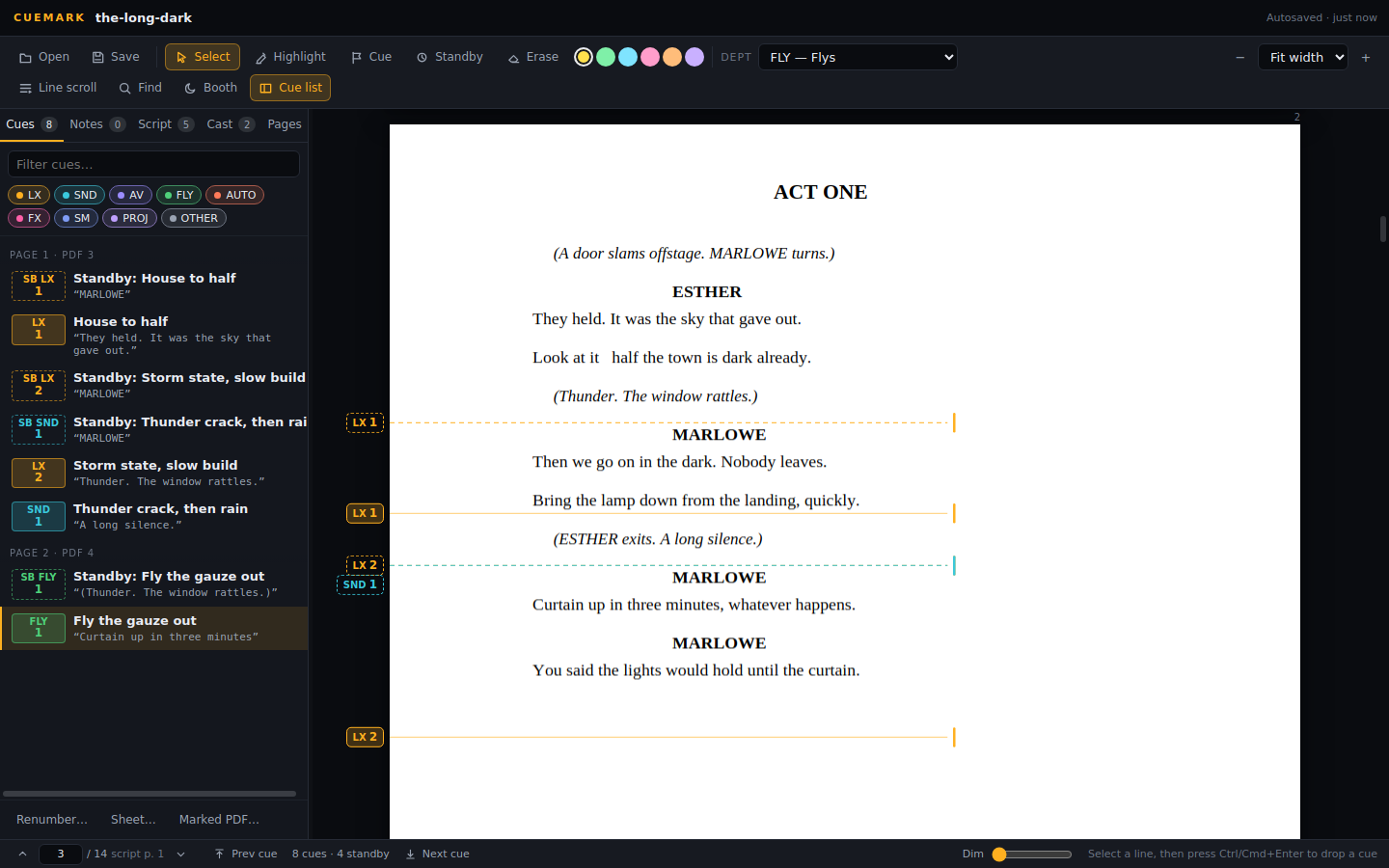
Cue list
Who it is for
Anyone who has a book to keep
Stage managers
The prompt book, marked up on screen instead of in pencil, and called from the same page — with the standbys placed for you, counted back in lines.
Sound operators
A cast list that knows who is on which mic, the performer's name written beside their lines, and a clean text copy of the script with your cue numbers against the words.
Lighting and the rest
Your own cues, your own numbering, your own book. Export a marked-up PDF that carries only your department, or print it for the desk.
Schools, am-dram and small venues
One licence, two machines, a year. A photocopied script works. Nobody has to learn a cueing console to run a nativity properly.
What it does
Built for the person calling it
Not a PDF reader with notes bolted on. Every part of it is shaped around one job: getting a show called cleanly, by someone who has to look up at the stage.
Cues where they fire
Select the word and drop the cue on it. Numbering follows on its own, per department, and renumbers when the director cuts a page. Point cues — 12.5 between 12 and 13 — the way a tech rehearsal makes them.
Standbys that count back
Say how many lines of warning you want and Cuemark places the standby, even when it lands on the page before.
A book for each department
LX, sound, flys, automation, follow spots, stage management — or types you name yourself. Print or export a PDF carrying only that department's cues.
The cast, read off the script
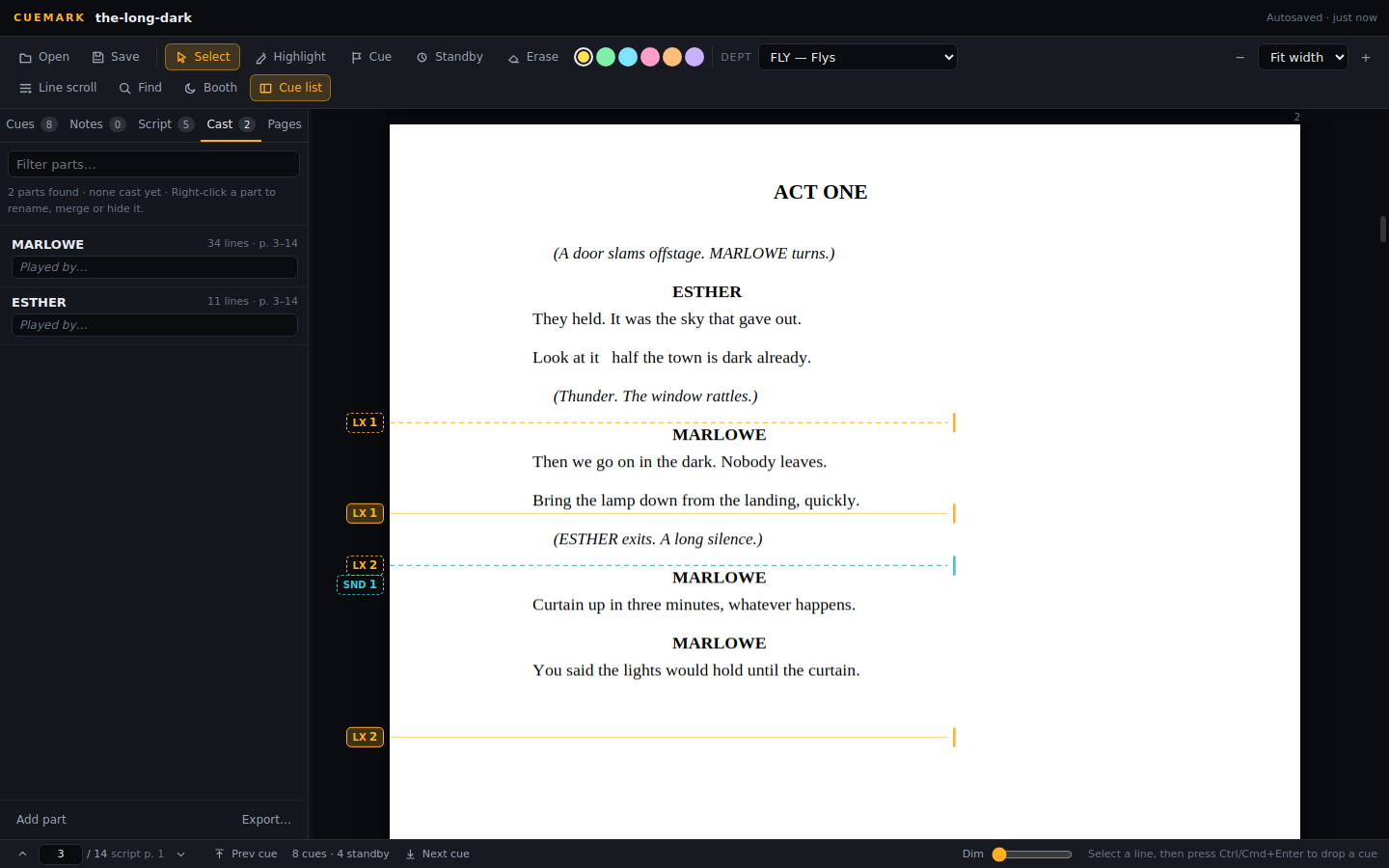
Cuemark reads the parts out of the script and offers them; you tick the real ones. Put a performer's name and mic channel against each, and the name appears beside their lines on the page.
Scanned scripts too
A photocopied rehearsal script is read on your own machine — never uploaded — so search, the cast and the cue list all work on it. Or turn it into a clean typed copy.
The sound script
A clean text copy of the dialogue with each speaker's fader beside their name and your cue numbers against the words they fire on. Export it, or work from it directly.
Pages that behave
Keep the cast list and the blank pages out of the book, tell it what the printed page numbers are, and the cue list says "p. 23" the way the director does.
Notes and highlights
Mark a line in a colour, hang a note on it. The words sit in the margin beside the line, at the size you want, and print with the book.
Rehearsal notes
The director's blocking, the MD's vamps, the choreographer's counts — each person marks in their own colour, and you bring their notes into your book with one press.
A new PDF, the same cues
The writers send a new draft, or the next venue has its own mic plot. Open the new PDF and every cue, note and mark follows its line onto it.
Shows that cannot be lost
Saved as you go, with earlier versions kept by themselves — before an update, before a bulk delete — and put back from Settings ▸ Backup.
Cue Cam
A USB or IP camera takes a picture of the stage as each cue goes, named after the cue and filed by performance — every state, every night.
Your book, your way
Cue numbers big or small, in either margin; note and rehearsal-mark colours, sizes and strength; where the reading line sits on the screen. It is your book.
Scanned scripts
A photocopy becomes a script
Most rehearsal copies are scans: grey, a little crooked, and not a word in them a computer can find. Cuemark reads the page on your own machine — nothing is uploaded — so search, the cast list and the cue list work on it. Then, if you want it, a clean copy: the same words, black on white, square, still yours to mark up.
DOCTOR
You see, her eyes are open.
GENTLEWOMAN
Ay, but their sense is shut.
LADY MACBETH
Out, damned spot! out, I say! One: two: why, then, 'tis time to do't. Hell is murky!
Reading the page
Put it right New in 0.15
Where the scanner smudged
A hole punch read as letters, half a word off the edge of the copier glass. Select it and press Remove, or Correct and type what it should say. The scan itself is never touched, and Ctrl+Z puts it back.
FIONA
Is the calendar open? Then we're late.
EED APAL, .[
PIPER
The whole wroldworld is waiting.
Show mode
Call the show from it
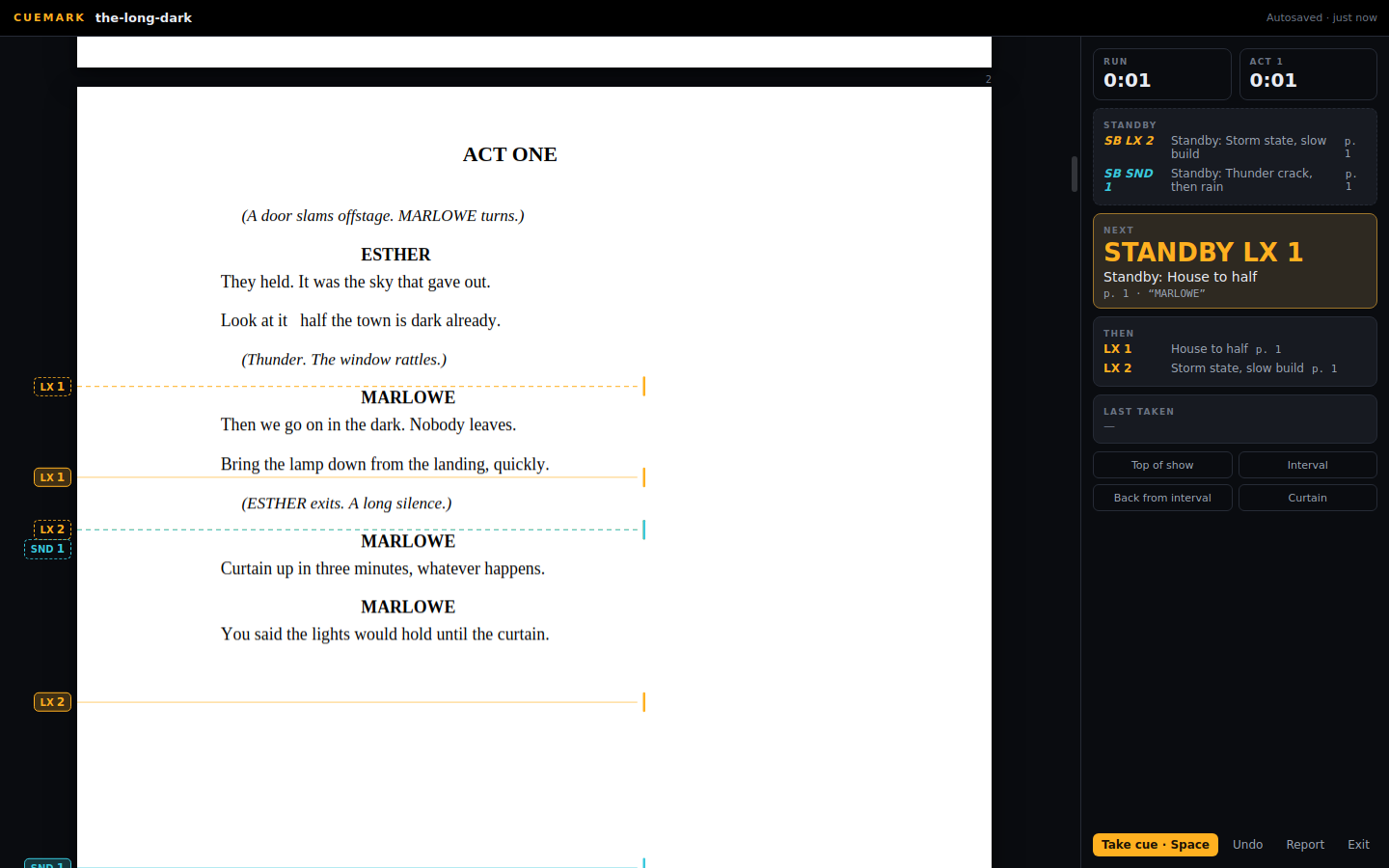
One line at a time, with the next cue on deck and the standby counting back. Press space, a pedal, or let your desk take the cue; the arrow keys move the script so your eyes stay on the stage. Took one early? One key puts it back.
Heigh, my hearts! cheerly, cheerly, my hearts!
Take in the topsail. Tend to the master's whistle.
(A cry within.)
What, must our mouths be cold?
The king and prince at prayers! let's assist them.
(A confused noise within: "We split, we split!")
Taken
A line across the page
The band between the arrows is where the show is. Whatever has scrolled past it has gone; the first cue still below it is the one on deck. Scroll, and the deck follows — or tell it not to. Drag either arrow to put the line where your eye falls.
The run, timed
Front of house clearance, Act 1 up, interval, Act 2 clearance, back, curtain. The running time starts at curtain up, every cue is logged with the time it was taken, and the report at the end is the one the producer wanted and nobody had to write.
A show night
From the half to the curtain
-
Before the half
Open the show. Everything is where you left it — cues, standbys, the cast, the notes — because it is a file on your disk, not a session on somebody's server. Hit Find if you have lost your place.
-
Top of show
Show mode. The toolbar goes, the page dims to what the booth wants, and the first cue is on deck. Press Top of show and the clock starts.
-
Mid act
Space takes the cue. The next one slides onto the line. A standby appears three lines early because that is what you asked for. A pedal or QLab can take it for you.
-
After
Curtain. The report has the running time, the interval, and every cue with the moment it went — ready to send on.
Triggers
It does not have to be the thing you touch
A pedal, QLab, a lighting desk, a Stream Deck through Bitfocus Companion. Cuemark takes OSC and MIDI, and sends its state back out, so the script follows the show rather than the other way round.
And the other way New in 0.15
A cue that presses a button
Give a cue a Companion button. When the reading line passes DCA 1, Cuemark presses it — the desk recalls the scene, the video rolls, the house lights go. Scroll back and nothing fires twice; a jump past a run of cues fires none of them.
So you'll be wanting the calendar, then.
DCA 1FIONA: The calendar's open.
Then we start on the first.
And not a moment before.
SND 6(The bell rings.)
There. Now we're late.
DCA 2PIPER: Everybody, from the top!
(They sing.)
SCENE 1 DCA
SCENE 2 BACK LINE ▲ LINE ▼ BOOTH
/location/1/0/2/press
/location/1/0/3/press
Rehearsals New in 0.15
Everybody's notes, one book
Rehearsal mode gives the director, the musical director and the choreographer their own marks — blocking, vamps and cut-offs, counts and lifts, cuts and questions — each in their colour and signed. They send them to you; you bring them in with one press, and show or hide each person's.
DIR BCrosses down to the bench and sits.
Well, that went about as well as it could.
MD VVamp until she's at the window
(She opens the window. Snow.)
CHO C5, 6, 7, 8 — ensemble in
All of it. Every bit of it.
New venue, new draft New in 0.15
A new PDF. Every cue still on its line.
Touring with a different mic plot at each venue, or a new draft from the writers in week two? Replace the script PDF and every cue, note and rehearsal mark finds its line on the new one. Where a speech moved, the cue moves with it; anything it cannot be sure of is listed for you to check.
SITTINGBOURNE · MIC PLOT AMAIDSTONE · MIC PLOT B
LX 22DAME: Now then, boys and girls!
(New line for Maidstone: the mayor waves.)
SND 9(A crash from the kitchen.)
BUTTONS: That'll be the soup.
LX 23DAME: Lights! Lights, I said!
Script replaced
Main and backup New in 0.15
If the laptop dies, the show does not
A second Cuemark on the booth network follows the first — every change, every GO, the page and the line — within a fraction of a second, with no internet involved. If the main goes quiet, the backup sounds the alarm and takes over at one press, exactly where the show was.
Not only theatre
Anybody who calls a show, or reads one
A conference, an awards night, a launch, a live broadcast: there is a script, there are cues on it, and somebody is calling them or reading them out. That is what Cuemark does.
Live event show callers
The run of show is the script: every lighting, playback, VT, graphics and camera cue on its word, the next one on deck, a Companion button pressed as it goes, and a backup laptop that takes over if the main goes down.
Voice of God
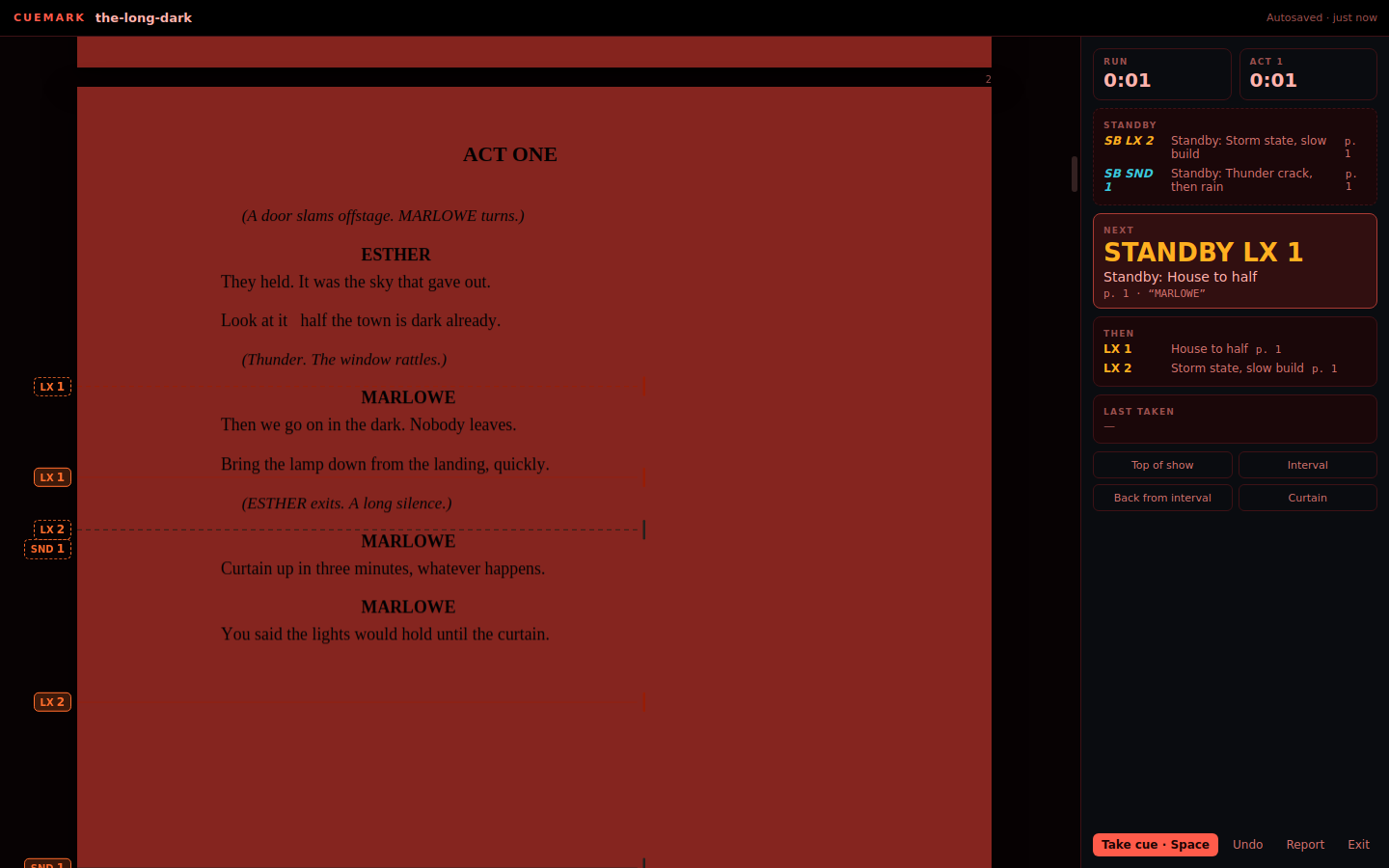
Each announcement marked with the cue that comes before it, read a line at a time with the line where you want it, a pedal to move on, and the page dimmed or red for the dark.
TV announcers
Live announce and continuity scripts with every in, out and hand-over marked, a running clock, and the script moved on by the gallery's OSC, MIDI or Stream Deck.
How Cuemark works for live events, Voice of God and TV announcing
Cue Cam In the beta
A photo of the stage at every cue
Plug in a USB webcam or point Cuemark at an IP camera, and as each cue goes in show mode — with GO, or as the script is read past it — Cue Cam keeps a picture of the stage, named after the cue and filed by performance. A record of every state, every night: for the show report, the re-light, and keeping a long run looking like opening night.
Every control the camera offers is in Settings ▸ Cue Cam, with a delay so the fade has finished first. A floating preview sits wherever you put it and never takes the keyboard — Space is still GO.
Cuemark Connect In testing
The whole company on the same page
Send the show round the company with one link. When it changes, send the new version; when somebody sends theirs back, you see every change first — cues added, moved, removed, notes, show details — and take only what you tick. Encrypted on your computer before it goes, so nobody else can read the script, us included.
Cuemark Connect · The Heist
The Heist: changes from Sam
The booth
It knows where it is
A red booth theme for working under a red lamp, a dimmer that goes darker than your screen wants to, and type that stays readable at arm's length.
Pricing
One price. No tiers, no seats to count.
Early access price
£49
a year · two machines · macOS and Windows
- A licence for a year from the day you buy it
- Two machines — a laptop and the booth, say — moved between them whenever you like
- macOS and Windows, the same licence
- Works offline, in a booth with no wifi
- Every update to this version
- Nothing is taken from your card again. Renew by buying another year — your shows stay where they are
The free version is the whole app on the two scripts it comes with, for as long as you like. No key, no account, no clock. A licence is what opens your own scripts.
Questions
The ones people ask
My script is a photocopy. Does that work?
Yes. Cuemark reads scanned pages on your own machine — the script never leaves it — so search, the cast list and the cue list work on it. It also makes a clean typed copy if you prefer to work from that.
Does it need the internet?
Once, to activate the licence. After that, none: it does not need a connection to work or to call a show. The only time it talks to anything is when you choose to share a show through Cuemark Connect.
Mac or Windows?
Both, on one licence. Your show files open on either.
I want it on my laptop and the booth machine.
That is what the two machines are for. Deactivate one from your account page or inside the app and its place is free immediately.
Where do my shows live?
In a file beside your script, on your disk. Back it up the way you back anything up. There is no cloud and nothing to export from.
Can it take the cue from my desk or QLab?
Yes — OSC and MIDI in, and it reports its state back out. A pedal through MIDI, QLab through OSC, a Stream Deck through Bitfocus Companion.
What happens when the year is up?
The date is on the licence screen and in Settings, and it keeps working to the day. Nothing is charged automatically; buy another year when you want one. Your shows are files and stay exactly as they are.
Does it replace anybody?
No. It replaces the pencil, the rubber and the photocopier. Cuemark does not write your cues, decide when they go, or call the show: you place every cue, and every GO is yours. Where it reads things for you — the words on a scanned page, the parts in the cast list — it shows you what it read, marks what it is unsure of, and you have the final say.
Something is wrong.
Email support@cuemark.co.uk. A person reads it.
Your work, your disk
Nothing leaves your machine unless you send it
No cloud, no telemetry. Your script is a file on your disk and it stays there. The app only goes online to check for a new version and that your licence is still good — neither sends anything of your show. Share a show through Cuemark Connect and it is encrypted on your computer before it goes, readable only by the people you let in. Scripts are confidential and rehearsal copies are licensed material; that is not a setting, it is how it is built.